Oct 2, 2026Business Solutions
Where Wholesale Buyers Get Listing Images
Your listing rises or falls on its images. What to ask a supplier for, what makes a photo usable on a marketplace, and the boundaries of free supplier images.
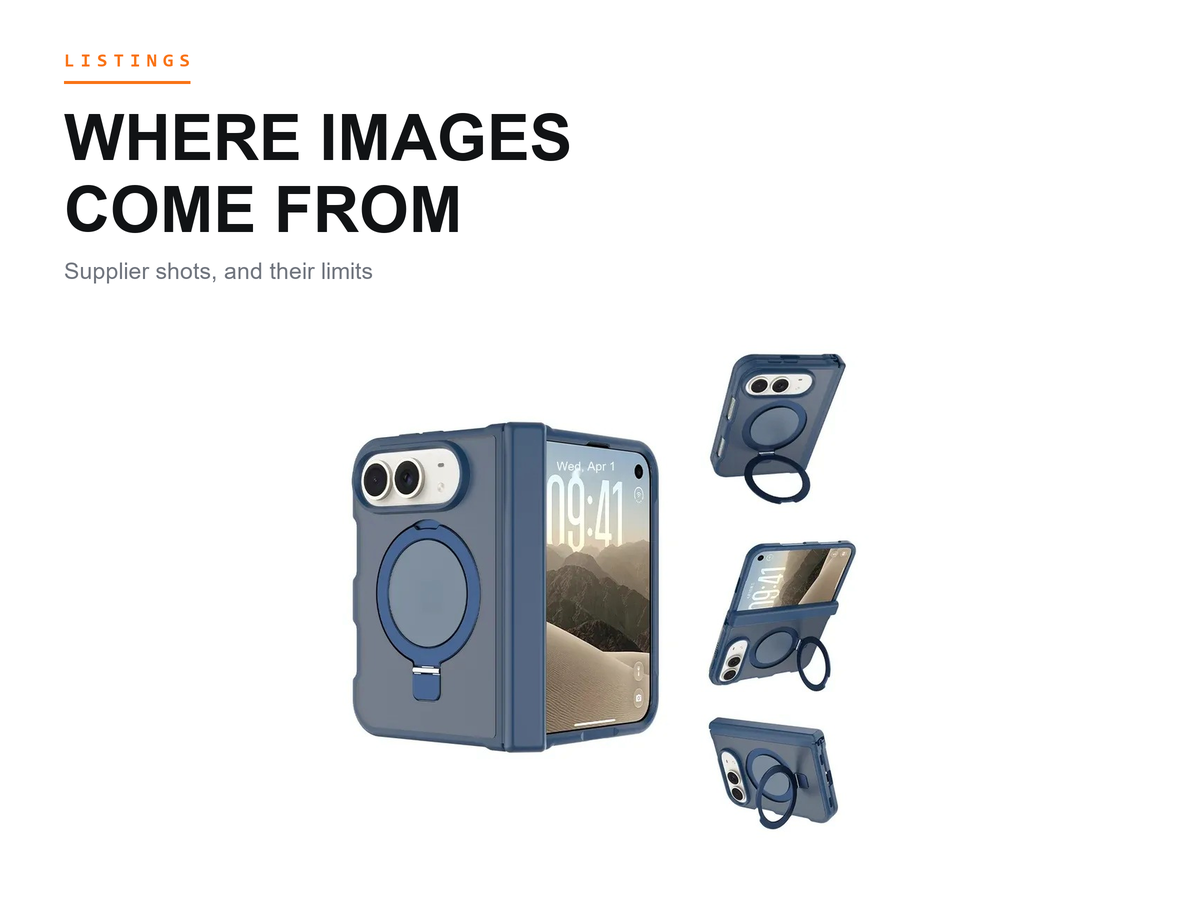
A wholesale case listing lives on its images. iFunSmart builds phone cases in Guangzhou, and buyers ask the same question during sourcing: where do the pictures come from? There are two sources, your own camera and your supplier's library. Most buyers end up using both, and the split matters more than it looks.
Last updated: October 2, 2026.
Two Sources for the Same SKU
Shooting your own photos gives you control. The color reads the way your stock actually looks, the framing fits your storefront, and nobody can hand your competitor the same file. The cost is time. One studio session per model, repeated for every colorway, and another session whenever the build changes.
A supplier image library is the set of photos a factory has already taken of the styles it builds and sells wholesale. Buyers use it to get a first listing live, then decide later which SKUs deserve their own shoot. On that path, we provide free HD images for the styles we have photographed.
A listing image set is what one SKU needs to go live: a main shot, one file per colorway, the detail views, and a scene image. The two sources answer different questions. Your camera answers whether the case looks like your brand. The library answers whether you can publish this SKU this week.
What Makes an Image Usable on a Marketplace
Usable comes down to a few properties, and none of them is about artistic taste. A plain background keeps the eye on the case rather than on the set. Focus should hold across the whole product, not just the middle. Color is the test customers run first, and it goes one way: the file has to match the physical unit you will ship.
A photo also has to be clean of marks you do not own. A watermark, a brand logo, or a recognizable graphic from someone else's catalogue can put a listing at risk even when the case itself is fine. That is why buyers ask for files with no third-party marks and no borrowed lifestyle props.
Consistency across the set matters as much as any single frame. When the main images share a backdrop and a light direction, a category page looks organized instead of assembled. A file that shows a different finish than the shipped unit is worse than a missing photo, because it turns a comparison into a return.
What to Ask a Supplier For in One Request
Ask once, in writing, and ask for everything the page needs. The main angle comes first: the view that will carry the listing. Next are the colorways, one file per color, labeled so you can match file to SKU without guessing.
Then the details that decide the purchase. On a case, that means the lens opening, the button covers, the inside surface, and any stand or hinge in the build. Buyers who skip detail shots end up answering the same customer question in text, one message at a time.
Scene images close the request: the case held in a hand, standing on a desk, or on the phone it was molded for. If a build carries a card slot, as on our clear card holder case for the iPhone 17, ask for the slot both empty and loaded. If you want to see the format we send, ask us for the image list on one model you already stock.
One more question belongs in the same message: does the file show the current production revision? Tooling gets revised. A photo from an older build can carry an older button shape, and a mismatch like that is what a customer photographs when the parcel and the page disagree.
How to Check Images After They Arrive
Match first, publish second. Lay the case beside the screen under daylight and compare tone, because a warm desk lamp makes both look wrong. A tinted build such as our translucent matte MagSafe case for the iPhone 18 Pro reads differently under different light, so the file and the sample have to share the same conditions before you judge.
Then work through coverage. Every color you plan to list should have a file, every model name in your catalogue should map to a shot, and the detail views should show the revision you received. A missing colorway is worth one message before you publish a page with a gap.
Check for stray marks too: a supplier's watermark, a logo you have no right to use, or a prop with someone else's branding. These slip past a phone-sized preview and get expensive after a takedown.
The Boundaries of Free Supplier Images
The offer is real, and so are its edges. Here is the line as we state it: we provide free HD images for the styles we have photographed. That covers photographed styles only. We cannot promise new photography for styles we have not photographed, and not every design has a finished photo set today.
Two more boundaries belong in writing. The conditions attached to the free images depend on the arrangement we confirm with you, and we do not publish a standard set of those conditions here. And the images show our build, not yours. Once you add your own logo or a private-mold change, the file no longer describes the product you will ship, and that SKU needs its own shoot.
We do not publish image specifications either. The file that works depends on where you list and how the page displays it, so a request is answered against a model and a platform together rather than against one standard format.
Common Questions From Buyers
Do I still need my own photos if the supplier provides images?
For many SKUs, no; for some, yes. A supplier file gets a listing live, but the moment your version differs from the photographed build, the file stops matching and your own camera becomes the only honest source. Sellers who run one brand across several platforms often shoot their own main image and keep supplier files for the detail views.
How do I know a supplier image matches the unit I received?
Compare before you trust. Put the sample next to the screen, check the button and lens shapes against the file, and read the color under daylight. If the file shows a revision you did not receive, ask for the current one or shoot your own. A mismatch found before publishing costs one message. The same mismatch found by a customer costs the sale.
Can I edit supplier images before publishing?
Yes, within limits. Cropping to your page format and clearing the background are normal practice. Changing the color, or hiding a defect the customer will meet in person, crosses into misrepresentation, and a buyer who compares the parcel with the page will say so in public. Keep the edit honest and the file stays useful.
What to Do Next
Build the request before you send it. Write down the models and colorways you plan to publish, mark which ones you have seen as samples, and send that list in one message. The answer comes back as a list of what exists, not a folder for you to sort.
We have molded cases in Guangzhou since 2010, and we hold 1,000+ molds. Buyers in 30+ countries work with us for this reason among others: the styles we have photographed come with images, and for everything else, the honest answer is your own camera.
Send us the models and colorways you plan to list, and we will tell you which of them already have a photo set and what each set contains.
Apple, iPhone, Samsung, and Galaxy are trademarks of their respective owners. iFunSmart is an independent manufacturer of phone cases and accessories and is not affiliated with, authorized, sponsored, or endorsed by Apple or Samsung.